Joysticks
A while back, I wrote an answer to a forum question on how to calculate the overall intensity (magnitude) of a joystick axis... 6 years after the question was asked. This is a copy of that post for my own records, in case that answer ever goes away. Hopefully it's helpful to you as well!
I decided to answer this question because I was looking for the answer myself, not for a Unity project but for a project in JS. I figured the Unity forums would be a pretty good knowledge source for joystick-related issues, so I happily clicked that search result. Unfortunately, the two existing answers (including the accepted one) were wrong. Worse still, when I read them, I knew exactly what those felt like in videogames (games where your fastest movement speed is when you are moving at a 45° angle). Anyways, here's my answer:
In order to do this right, you have to normalise against the maximum
possible magnitude for that angle. If you just clamp the magnitude of
the vector to [0, 1] you only have to move
Mathf.Sqrt(magnitude) in any diagonal direction to get the
same normalised magnitude as moving magnitude in a
horizontal or vertical direction. You run into the opposite problem if
you just take the max of the 2 magnitudes, where diagonals are
underrepresented instead of overrepresented.
Vector2 and Mathf
Vector2 and Mathf
Vector2 vector = new Vector2(
  Input.GetAxis("Horizontal"),
  Input.GetAxis("Vertical")
);

float angle = Mathf.Atan2(vector.x, vector.y);
float maxMagnitude =
  Mathf.Abs(vector.x) > Mathf.Abs(vector.y)
    ? 1 / Mathf.Sin(angle)
    : 1 / Mathf.Cos(angle);

float magnitude =
  abs(vector.magnitude / maxMagnitude);
The code above is specific to C# and Unity, but it's pretty easy to adapt
for any environment/language that has basic floating-point or decimal
math functions and where the joystick input is 2 separate axes, each in
the range of [-1, 1]. Since I was looking for a JS answer,
it would be rude of me not to include my JS solution:
function vectorFromJoystick({ x, y }) {
  const direction = Math.atan2(y, x);
  const directionAbsolute = direction < 0
    ? TAU + direction
    : direction;

  const rawMagnitude = Math.sqrt(x ** 2 + y ** 2);
  const maxMagnitude = Math.abs(x) > Math.abs(y)
    ? 1 / Math.sin(direction)
    : 1 / Math.cos(direction);
  const magnitude =
    rawMagnitude / Math.abs(maxMagnitude);

  return { direction, directionAbsolute, magnitude };
}
I had some additional requirements/concerns with this that came out of how
JS's built-in Math functions work. Math.atan2
returns a number in the range [-π, π]. I added
directionAbsolute which converts that to its
[0, 2π] unit circle equivalent. That might be an issue with
the C# code as well, as I did not test that as heavily as the JS one.
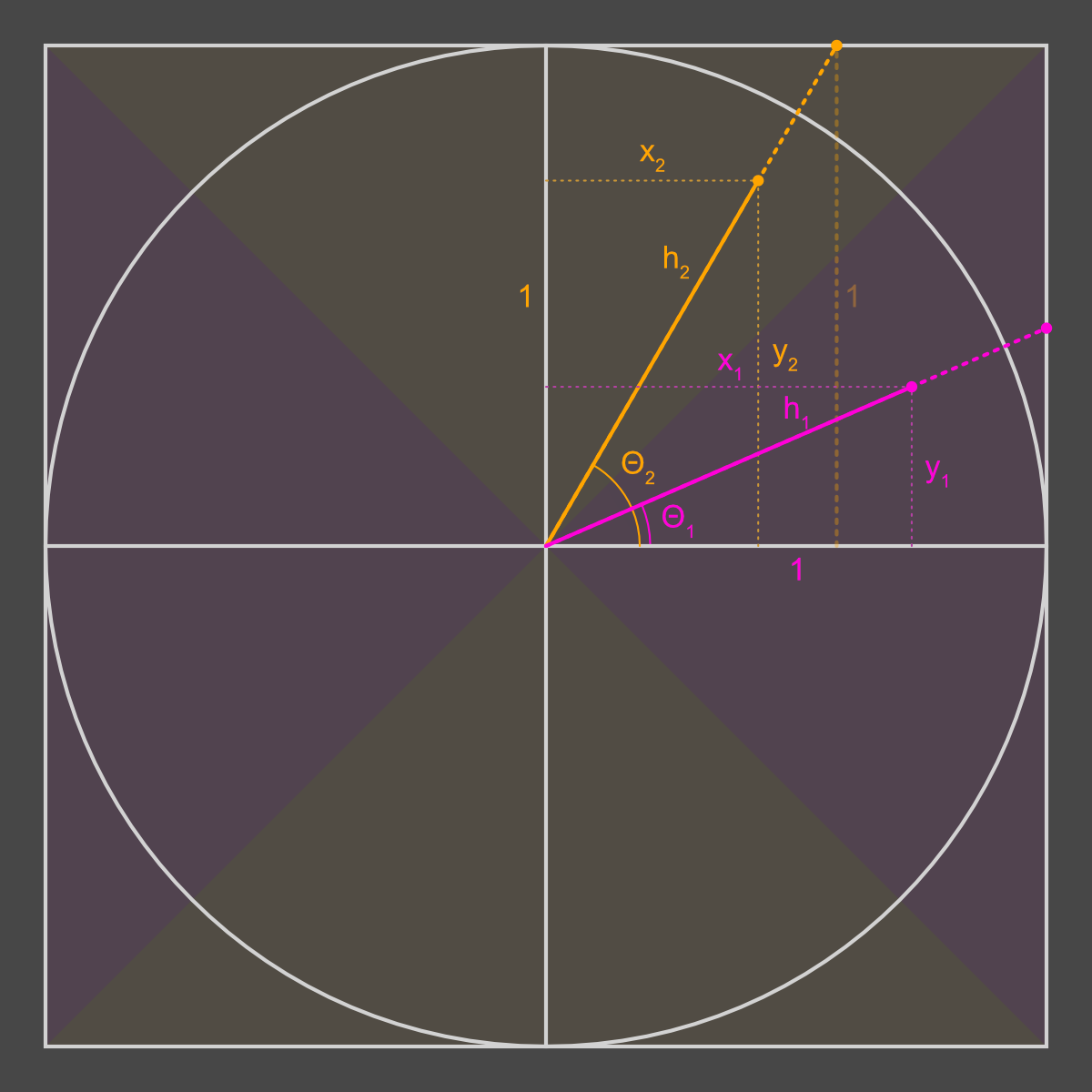
The circle here is the unit circle, and the enclosing square encloses all possible {x,y} values that can be given back by a joystick. The orange and pink dots are 2 example positions of the joystick, which fall into the 2 separate pink and orange tinted parts of the graph respectively. These tinted areas represent the 2 different cases that are handled by the ternary in the code above — more on that later.
The fundamental problem is that the magnitude coming out of the vector
is relative to that outer square, but you want the magnitude relative
to the unit circle, so that it is always in the range [0, 1]. You also
want it to stay proportional no matter where the joystick is, so if the
joystick's current values fall outside of the unit circle (e.g.
{ x: 0.9, y: 0.9 }) the output magnitude should be almost
but not quite 100%, because the user isn't actually pushing the
joystick full-speed-ahead in that direction.
The solution is pretty straightforward: we take the vector's value and divide it by the maximum possible magnitude at that angle. In the diagram, the vector's value is the solid coloured line, and the maximum possible magnitude is that plus the dotted line extending all the way to the edge of the square.
Like I said before, there are 2 cases. Both are gonna use some trig to calculate the maximum possible lengths, taking advantage of the fact that we're working with right triangles.
Looking at the diagram, we know θ1 (the angle)
and the length of the adjacent side from that corner (that pink
1). We want to find h1, which is the maximum possible
magnitude at that angle. Referring to your trigonometric ratios (or
wikipedia if you're like me and forgot them all) you'll see that the
cosine of an angle θ is the ratio between the adjacent side and the
hypotenuse, so we can use that to calculate the length of the
hypotenuse. The formula is:
cos(θ1) = adjacent / hypotenuse = 1 / h1
Solving for h1, we get:
h1 = 1 / cos(θ1)
The problem we're solving is exactly the same here: how long is the
hypotenuse (h2 in this case). However, the 1-length side is
now opposite θ2 instead of adjacent to it (you can see this
side in faint dotted orange). No problem, as sine is the ratio between the
opposite and hypotenuse.
sin(θ2) = opposite / hypotenuse = 1 / h2
again, solving for h2 this time:
h2 = 1 / sin(θ2)